

Accuracy workflow#
The accuracy workflow of xDEM performs an accuracy assessment of an elevation dataset.
This assessment relies on analyzing the elevation differences to a secondary elevation dataset on static surfaces, as an error proxy to perform coregistration and bias-correction (systematic errors) and to perform uncertainty quantification (structured random errors).
More reading
For scientific background on this workflow, we recommend reading the Static surfaces as error proxy, Grasping accuracy and precision and Spatial statistics for error analysis guide pages.
Caution
This workflow is still in development and its interface may thus change rapidly. It currently includes only co-registration, and we are adding support for uncertainty quantification.
Basic usage#
Below is an example of basic usage for the accuracy workflow, including how to build your configuration file, and how to run xdem accuracy and interpret its logging output and report.
Configuration file#
The configuration file of the accuracy workflow contains four categories: inputs, outputs, coregistration and statistics.
Only the paths to the two elevation datasets in the inputs section are required parameters. All others can be left out, in which case they default to pre-defined parameters.
By default, the accuracy workflow reprojects on the reference elevation dataset, performs a Nuth and Kääb (2011) coregistration (horizontal and vertical translations) on all terrain, computes 15 different statistics, and saves level-1 (intermediate) outputs in ./outputs .
In the example of configuration file below, we define:
The paths to the two elevation datasets which are required,
The path to a vector of unstable surfaces to exclude terrain during the analysis (polygon interior is excluded),
The path to an output directory where the results will be written,
The name of the coregistration method to run, and the subsample size to use,
The specific list of statistics to compute after/before coregistration.
inputs:
  reference_elev:
    path_to_elev: "../../../xdem/example_data/Longyearbyen/data/DEM_2009_ref.tif"
  to_be_aligned_elev:
    path_to_elev: "../../../xdem/example_data/Longyearbyen/data/DEM_1990.tif"
    path_to_mask: "../../../xdem/example_data/Longyearbyen/data/glacier_mask/CryoClim_GAO_SJ_1990.shp"
outputs:
  path: "outputs_accuracy"
coregistration:
  step_one:
    method: "LZD"
    extra_information: {"subsample": 10000}
statistics:
- median
- nmad
- validcount
For details on the individual parameters, see Configuration parameters further below. For generic information on the YAML configuration file, see the Command line interface page.
Tip
To display a template of all available configuration options for the YAML file, use the --template-config argument.
Running the workflow#
Now that we have this configuration file, we run the workflow.
!xdem accuracy --config accuracy_config.yaml
The logging output is printed in the terminal, showing the different steps. For instance, we can see that the coregistration converged in three iterations.
Finally, a report is created (both in HTML and PDF formats) in the output directory.
We can visualize the report of our workflow above:
Workflow details#
This section describes in detail the steps for the accuracy workflow, including a summary chart and all parameters of its CLI interface.
Chart of steps#
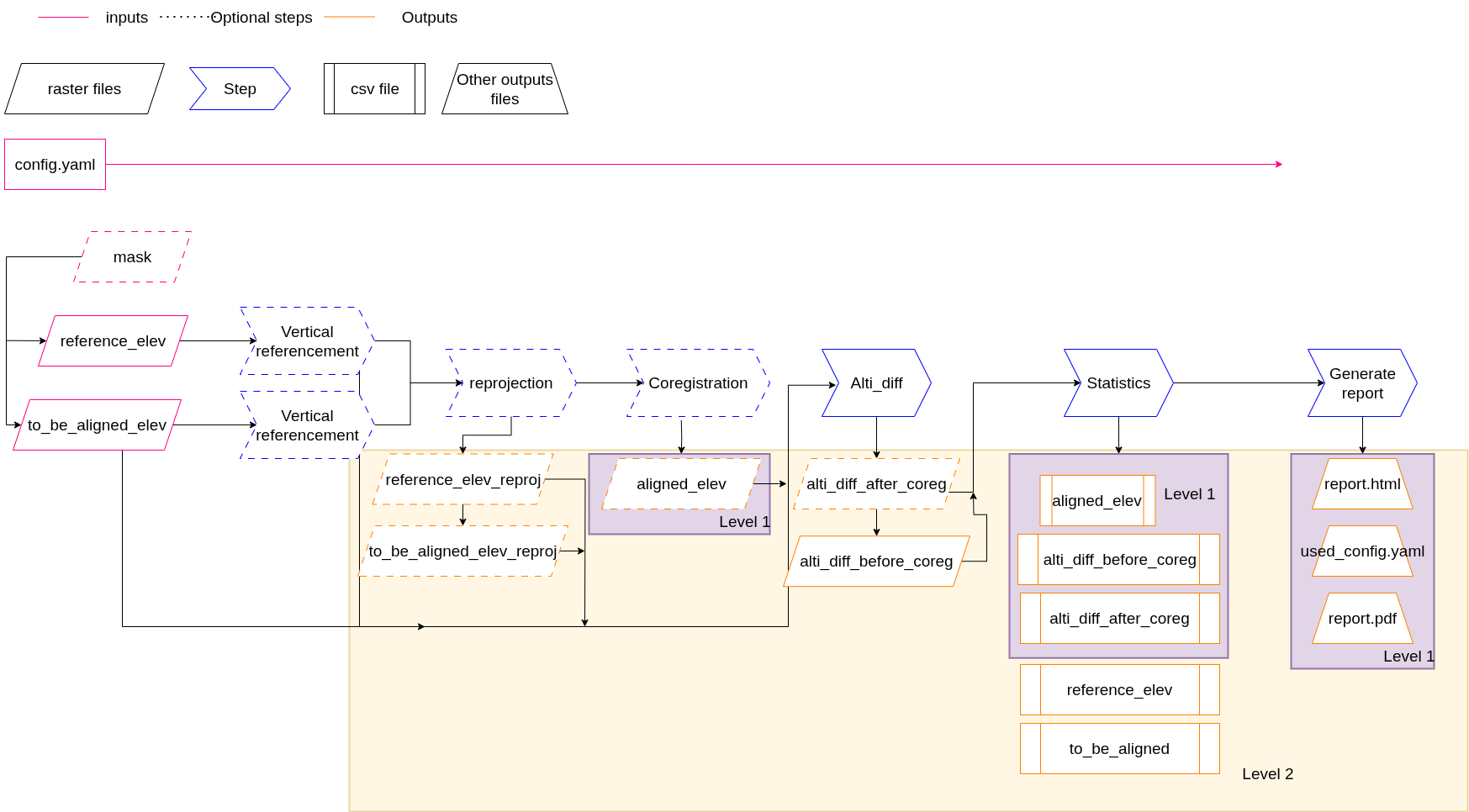
The accuracy workflow, including its inputs, outputs, processing steps and output detail level, are described on the following chart:
Configuration parameters#
The parameters to pass to the accuracy workflow are divided into four categories:
The
inputsdefine file opening and pre-processing, including two required paths to elevation data, but also optional masking, CRS and nodata over-riding, and downsampling factor,The
outputsdefine file writing and report generation, with various levels of detail for the produced outputs,The
coregistrationdefine steps for coregistration, directly interfacing with the Coregistration module of xDEM,The
statisticsdefine steps for computing statistics before/after coregistration, directly interfacing with the Statistics module of GeoUtils.
These categories and detailed parameter values are further detailed below:
Required: Yes
Inputs information, split between reference and to-be-aligned elevation data.
Name |
Description |
Type |
Default |
Required |
|---|---|---|---|---|
|
Path to reference elevation |
str |
Yes |
|
|
No data elevation |
int |
No |
|
|
Path to mask associated to the elevation |
str |
No |
|
|
Original vcrs |
int, str |
|
No |
|
Destination vcrs |
int, str |
|
No |
|
Downsampling elevation factor >= 1 |
int, float |
1 |
No |
Note
For transforming between vertical CRS with from_vcrs/to_vcrs please refer to Vertical referencing.
The downsample parameter allows the user to resample the elevation by a round factor.
The default value of 1 means no downsampling.
And, if you want to test the CLI with xDEM example data, they can also refer to data alias. Please refer to data-example to have more information.
Raster to match for reprojection.
Value |
Description |
Default |
|---|---|---|
|
To-be-aligned elevation will be reprojected to the reference elevation |
Yes |
|
Reference elevation will be reprojected to the to-be-aligned elevation |
No |
|
No reprojection with coregistration process or not |
No |
Note
If the coregistration process is activated, sampling_grid must be set.
Otherwise, the reprojection can be skipped (indicated by sampling grid: null).
In that case, the two inputs need to have the same shape, transform and CRS.
.:::
inputs:
    reference_elev:
        path_to_elev: "path_to/reference_elev.tif"
        force_source_nodata: -32768
        from_vcrs: null
        to_vcrs: null
    to_be_aligned_elev:
        path_to_elev: "path_to/to_be_aligned_elev.tif"
        path_to_mask: "path_to/mask.tif"
    sampling_grid: "reference_elev"
Note
The null and None values are both accepted in YAML files, which correspond to None in the Python API.
Required: No
Coregistration step details.
You can create a pipeline with up to three coregistration steps by using the keys
step_one, step_two and step_three.
Available coregistration method see Coregistration.
Note
By default, coregistration is carried out using the Nuth and Kääb (2011) method.
To disable coregistration, set process: False in the configuration file.
Parameter name |
Subparameter name |
Description |
Type |
Default |
Available |
Required |
|---|---|---|---|---|---|---|
|
|
Name of coregistration method |
str |
NuthKaab |
Every available coregistration method |
No |
|
Extra parameters fitting with the method |
dict |
No |
|||
|
Activate the coregistration |
bool |
True |
True or False |
No |
Note
The data provided in extra_information is not checked for errors before executing the code.
Its use is entirely the responsibility of the user.
coregistration:
  step_one:
    method: "NuthKaab"
    extra_information: {"max_iterations": 10}
  step_two:
    method: "DHMinimize"
  process: True
Other example:
coregistration:
  step_one:
    method: "VerticalShift"
  sampling_grid: "reference_elev"
  process: True
Required: No
Statistics step information. This section relates to the computed statistics:
If no block is specified, all available statistics are calculated by default:
[mean, median, max, min, sum, sum of squares, 90th percentile, LE90, nmad, rmse, std, valid count, total count, percentage valid points, inter quartile range]
If a block is specified but no statistics are provided, then no statistics will be computed.
If a block is specified and some statistics are provided, then only these statistics are computed.
statistics:
  - min
  - max
  - mean
If a mask is provided, the statistics are also computed inside the mask.
Required: No
Outputs information. Operates by levels:
Level 1 → aligned elevation only
Level 2 → more detailed output
Name |
Description |
Type |
Default |
Available |
Required |
|---|---|---|---|---|---|
|
Path for outputs |
str |
outputs/ |
No |
|
|
Level for detailed outputs |
int |
1 |
1 or 2 |
No |
|
Grid for outputs resampling |
str |
reference_elev |
reference_elev or to_be_aligned_elev |
No |
outputs:
    level: 1
    path: "path_to/outputs"
    output_grid: "reference_elev"
Tree of outputs for level 1 (including coregistration step):
- root
  ├─ tables
  │   └─ aligned_elev_stats.csv
  ├─ plots
  │   ├─ diff_elev_after_coreg_map.png
  │   ├─ diff_elev_before_coreg_map.png
  │   ├─ diff_elev_before_after_hist.png
  │   ├─ reference_elev_map.png
  │   ├─ masked_elev_map.png (if mask_elev is given in input)
  │   └─ to_be_aligned_elev_map.png
  ├─ rasters
  │   └─ aligned_elev.tif
  ├─ report.html
  ├─ report.pdf
  └─ used_config.yaml
Tree of outputs for level 2 (including coregistration step):
- root
  ├─ tables
  │   ├─ aligned_elev_stats.csv
  │   ├─ diff_elev_after_coreg_stats.csv
  │   ├─ diff_elev_before_coreg_stats.csv
  │   ├─ reference_elev_stats.csv
  │   └─ to_be_aligned_elev_stats.csv
  ├─ plots
  │   ├─ diff_elev_after_coreg_map.png
  │   ├─ diff_elev_before_coreg_map.png
  │   ├─ diff_elev_before_after_hist.png
  │   ├─ reference_elev_map.png
  │   ├─ masked_elev_map.png (if mask_elev is given in input)
  │   └─ to_be_aligned_elev_map.png
  ├─ rasters
  │   ├─ aligned_elev.tif
  │   ├─ diff_elev_after_coreg.tif
  │   ├─ diff_elev_before_coreg.tif
  │   └─ to_be_aligned_elev_reprojected.tif
  ├─ report.html
  ├─ report.pdf
  └─ used_config.yaml